Modern marketing demands tools that are both visually compelling and functionally smart, and customizable QR codes check both boxes. Whether you are running a product launch, managing a multi-channel campaign, or promoting a local event, QR codes give your audience an instant, frictionless path from physical to digital. The challenge is knowing which services offer the flexibility, branding control, and analytics your marketing strategy actually needs. This guide covers everything you need to find the right solution and use it effectively.
Why Customizable QR Codes Are a Marketing Essential
A standard black-and-white QR code works just fine as a utility. But a customizable QR code works as a brand asset. When you can match a QR code to your brand colors, embed a logo, and control the shape of the data modules, the code stops looking like an afterthought and starts functioning as part of your creative. That visual consistency builds trust with your audience, which matters especially in print advertising, product packaging, and out-of-home placements where you have only a few seconds to earn a scan.
Beyond aesthetics, customizable QR codes open the door to more sophisticated marketing workflows. Dynamic QR codes (a feature offered by most serious QR code platforms) allow you to change the destination URL without reprinting the code. This means a single code printed on a thousand mailers can redirect to a seasonal sale, a new product page, or an updated event registration form, all without producing new materials. For brands managing ongoing campaigns, that level of flexibility is a significant advantage.
Customization also extends to tracking. Many QR code generator services include built-in analytics dashboards that show scan volume, device type, geographic location, and time-of-day data. When you treat a QR code as a trackable marketing channel rather than a static shortcut, you gain data that can inform your next campaign.
What to Look for in a QR Code Service for Marketing
Not every QR code generator is built for marketing use. Some are basic utilities that produce a code and nothing more. When evaluating services for professional and marketing purposes, the following capabilities are worth prioritizing.
Design flexibility. Look for services that let you customize colors, corner styles, module shapes, and logo placement. The more control you have over the visual output, the more seamlessly the code will integrate into your existing brand materials.
Dynamic vs. static codes. Static QR codes encode the destination directly into the pattern and cannot be changed. Dynamic codes store a short redirect URL in the pattern and allow the destination to be edited after printing. For any ongoing marketing campaign, dynamic codes are strongly preferred.
File export options. For print materials, you need high-resolution vector files (SVG or EPS) rather than low-resolution PNGs. A service that only exports raster images at small sizes will create problems when you scale a code up for a poster or billboard.
Analytics and tracking. Scan data is only useful if you can access it. Look for services that provide real-time scan analytics, ideally broken down by location, device, and time period.
Integration capabilities. Some platforms integrate with URL shorteners, CRM tools, or marketing automation software, which can streamline your workflows considerably.
10 Tips for Getting the Most Out of Customizable QR Code Generators
1. Match Your QR Code to Your Brand Identity
A QR code does not have to be black and white. Use your brand’s primary and secondary colors for the foreground and background of the code, and embed your logo in the center module. This instantly signals to your audience that the code is intentional and trustworthy, rather than something generic. Just be sure to maintain enough contrast between the foreground and background so that scanners can still read the code reliably.
When choosing colors, test the code with multiple devices before finalizing. Some color combinations that look great visually can reduce scannability if the contrast ratio drops too low. A quick scan test on both iOS and Android is always worth the extra two minutes.
2. Use Adobe Express to Design and Export Your QR Code
For marketers who want full creative control without a steep learning curve, Adobe Express offers a purpose-built solution. You can create QR code designs that match your brand with customizable colors, downloadable in formats suitable for both digital and print use. The tool integrates with Adobe’s broader design ecosystem, making it easy to drop your finished QR code directly into a flyer, social post, social banner, or product label without extra file conversion steps.
Adobe Express is particularly useful for marketing teams that are already working within the Adobe suite, as it eliminates the need to jump between multiple platforms. The QR code generator is straightforward enough for one-person operations but robust enough for agency workflows.
3. Always Opt for Dynamic Codes in Ongoing Campaigns
If your QR code is going on printed materials, packaging, or signage that will be in circulation for more than a few weeks, use a dynamic code. The ability to update the destination URL after printing is not just a convenience; it is a campaign safeguard. Imagine printing 5,000 postcards with a QR code pointing to a landing page that later needs to be retired or updated. With a static code, you have no recourse. With a dynamic code, you redirect the traffic in minutes.
Dynamic codes also make A/B testing easier, since you can redirect the same printed code to different landing page variants during different time windows and compare performance data without touching the physical materials.
4. Size Your QR Code Correctly for Each Placement
One of the most overlooked QR code best practices in marketing is correct sizing. A code that is too small will fail to scan reliably from a normal viewing distance. As a general rule, the minimum print size for a QR code is 1 inch by 1 inch for materials that will be held in the hand, such as business cards or flyers. For signage that will be viewed from a distance, scale the code proportionally. The standard guidance is that the code should be at least one-tenth the size of the distance from which it will be scanned.
Always export your code as a vector file (SVG or PDF) for print placements. Vector files scale without losing resolution, while raster images will pixelate if scaled up too aggressively. Most professional QR code services offer vector export options for exactly this reason.
5. Include a Clear Call to Action Near the Code
A QR code by itself gives your audience no context for what happens after they scan it. Pairing the code with a short, specific call to action dramatically improves scan rates. Language like “Scan to watch the demo,” “Scan for an exclusive discount,” or “Scan to register” tells people exactly what value they will receive, which removes hesitation.
Place the call to action directly above or below the code in legible type. Avoid vague prompts like “Scan me” or “Learn more,” which do not communicate a clear benefit. The more specific and value-forward your call to action, the higher your conversion rate from physical impression to digital engagement.
6. Leverage QR Codes Across Multiple Channels
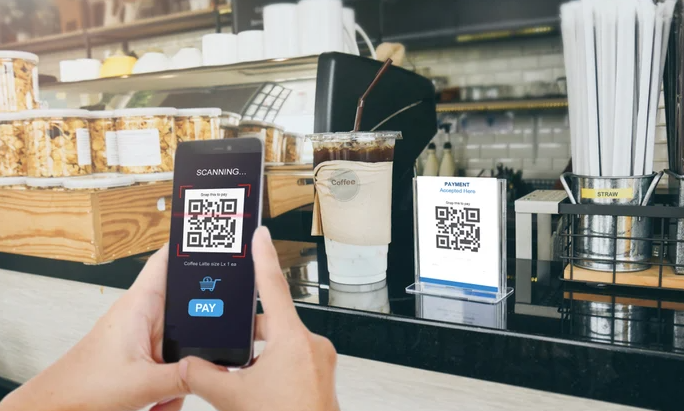
QR codes are not limited to print. They can be embedded in email footers, displayed on digital screens at events, included in social media graphics, and even printed on merchandise. Each placement opens a different segment of your audience to a direct digital touchpoint, making QR codes one of the most versatile tools in an omnichannel marketing strategy.
For events, QR codes on name badges, registration desks, or presentation slides can direct attendees to resource pages, feedback forms, or follow-up content without requiring staff to manage handouts or links manually. This reduces friction and increases engagement rates with your post-event content.
7. Track Performance with UTM Parameters
When building the destination URL for your QR code, append UTM parameters to the link before generating the code. UTM parameters allow Google Analytics and other tracking platforms to attribute traffic correctly to the specific campaign, medium, and source associated with that code. Without UTMs, scan traffic typically appears as “direct” traffic in your analytics, making it difficult to measure the true performance of your QR code placements.
A basic UTM string for a printed postcard campaign might look like: ?utm_source=postcard&utm_medium=print&utm_campaign=spring_sale. With this in place, every scan is captured as a distinct, attributable visit in your analytics dashboard, giving you clear data on which placements are driving results.
8. Test Every QR Code Before Publishing or Printing
This sounds obvious, but it is one of the most commonly skipped steps in QR code marketing. Always scan your generated code with at least two different devices before using it in any campaign. Verify that it resolves to the correct destination, that the page loads correctly on mobile, and that the landing experience matches the promise of your call to action.
If your QR code is going to print, test a physical proof as well. Digital-to-print color shifts can sometimes affect scannability, particularly with non-standard module colors. Catching a problem on a proof is far less costly than discovering it after a full print run.
9. Optimize Your Landing Page for Mobile
Every QR code scan is a mobile visit. If the page your code points to is not optimized for mobile devices, you will lose that traffic almost immediately. Make sure the landing page loads quickly on a mobile connection, displays correctly on small screens, and that any forms, buttons, or CTAs are large enough to be tapped with a finger.
Page load speed is especially important. Research on mobile user behavior consistently shows that load times above three seconds cause a majority of users to abandon a page. Compress images, minimize redirects, and consider using a dedicated mobile landing page rather than routing scans to a standard desktop-oriented website.
10. Refresh Destination URLs Seasonally
One of the underused advantages of dynamic QR codes is the ability to keep printed materials relevant season after season. A QR code printed on a product package in the fall can redirect to a holiday gift guide in December, a Valentine’s Day promotion in February, and a spring sale in March, all from the same code, without reprinting a single piece of packaging.
Building a regular URL refresh cadence into your marketing calendar ensures that QR code placements continue to deliver value long after the original campaign ends. It also means your investment in designing and printing materials with QR codes yields a longer return period, which is particularly meaningful for small businesses with limited print budgets.
See also: How Trendy Technologies Are Shaping the Next Generation of Casino Games As We Know Them
Frequently Asked Questions
What is the difference between a static and a dynamic QR code, and which should I use for marketing?
A static QR code encodes its destination URL directly into the visual pattern of the code itself. Once it is generated and printed, the destination cannot be changed without generating and reprinting an entirely new code. A dynamic QR code, by contrast, encodes a short redirect URL that points to a server-side record, which can be updated at any time without changing the physical code. For virtually any marketing application, dynamic codes are the better choice because they allow you to update destinations, run seasonal campaigns, and track performance data over time. The only scenario where a static code might be preferred is for permanent applications like a business card with a link to a personal website that will never change, where the simplicity and lack of a required subscription is appealing.
How can I track how many people are scanning my QR codes?
The most reliable way to track QR code scans is to use a dynamic QR code service that includes a built-in analytics dashboard. These platforms record each scan event and typically provide data including total scans, unique scans, scan location by country or city, device type (iOS vs. Android), and time-of-day patterns. For more granular marketing attribution, you should also append UTM parameters to your destination URL before generating the code, which allows platforms like Google Analytics to connect scan traffic to specific campaigns and placements. If you want to shorten long URLs with UTM strings before encoding them into your QR code, a tool like Bitly offers both link shortening and click-tracking in one place, making your destination URLs cleaner and your data more organized.
Can I use a customizable QR code on product packaging?
Yes, and product packaging is one of the strongest use cases for customizable QR codes. Brands use packaging QR codes to direct customers to video tutorials, ingredient sourcing information, loyalty program sign-ups, customer reviews, and reorder pages. Because packaging is a controlled, high-visibility surface, the QR code can be designed to integrate seamlessly with the label layout and brand aesthetic. The key technical requirement for packaging use is that you export the QR code as a vector file (SVG or EPS) so it scales without quality loss at any print size. You should also confirm that the code will have sufficient contrast against the packaging background color, since some label substrates and finishes can affect scannability.
What resolution and file format should I use when exporting a QR code for print?
For any print application, vector formats are strongly preferred over raster formats. SVG and EPS files are resolution-independent, meaning they scale to any size, from a business card to a billboard, without any loss of sharpness or scannability. If your QR code generator only exports raster formats like PNG or JPEG, request the highest resolution available and avoid scaling the image above 100% of its exported size. For standard print materials at 300 DPI, a PNG exported at a minimum of 1000 x 1000 pixels provides acceptable quality for sizes up to roughly 3 inches square. When in doubt, contact your print vendor and ask what format and minimum resolution they recommend for QR codes specifically.
Are free QR code generators suitable for professional marketing use?
Free QR code generators can be suitable for limited, one-off marketing use cases, but they come with meaningful trade-offs that matter at a professional level. Most free services only generate static codes, which cannot be updated after printing and do not include scan analytics. Free tools also typically offer limited design customization, lower-resolution export options, and no integration with marketing or analytics platforms. For campaigns where you need dynamic codes, branded design, high-resolution print files, and performance tracking, a paid or subscription-based service provides significantly more value. Many professional-tier platforms offer free trials or entry-level plans that are accessible for small businesses and freelancers who need more than a basic utility but are not ready for an enterprise commitment.
Conclusion
Customizable QR codes have moved well beyond novelty status and are now a practical, high-performing component of modern marketing strategies. The right QR code generator gives you the design control to make codes that look on-brand, the flexibility to update destinations as campaigns evolve, and the analytics to measure what is actually working. Whether you are placing codes on print materials, product packaging, event signage, or digital content, visual customization combined with performance tracking turns a simple scannable pattern into a meaningful marketing channel.
As you evaluate services and build your QR code strategy, prioritize tools that support dynamic codes, vector exports, and mobile-optimized destinations. Test every code before it goes live, keep calls to action specific, and revisit destination URLs regularly to keep printed materials working harder for longer. With the right foundation in place, customizable QR codes can deliver measurable value across every stage of your marketing funnel.